What is Semantic File Search? (And Why It Beats Traditional Search)
TL;DR
Semantic file search uses vector embeddings and local AI models to find files by meaning instead of exact keywords. Unlike traditional keyword search (like Spotlight), it understands concepts, synonyms, and context. Dhito performs this 100% on-device with zero cloud dependency, supporting documents, images, videos, and audio.
Have you ever spent fifteen minutes looking for a file, knowing it exists, but unable to remember its name? You try searching for "Q3_Report_Final" or "Project_Update_Draft", but nothing comes up. Traditional file search relies on exact keyword matching, which means unless you remember the precise name or key phrases, you are out of luck.
Semantic file search changes the game completely. Instead of looking for exact letters, it searches by *meaning*.
Let’s dive into how semantic search works and why it is a massive upgrade over traditional local search.
The Problem with Traditional Keyword Search
For decades, operating systems have used keyword-based indexing (like macOS Spotlight or Windows Search). These systems build an index of every word in every file name and document. When you search, the computer acts like a simple dictionary: it finds exact matches or prefix matches of the words you typed.
While fast, this approach has massive limitations:
- The Lexical Mismatch: If you search for "hiring guide", you won’t find a document titled "Recruitment Process Overview," despite them covering the exact same topic.
- Synonyms & Context: Traditional search does not know that "automobile" and "car" are the same thing, nor does it understand the difference between "Apple bank statement" (the tech company) and "Apple orchard guide" (the fruit).
- No Conceptual Search: You cannot search for abstract concepts. Typing "where did we discuss the new office layout?" will only return results if those exact words are typed.
- Strict Media Search: Traditional search cannot "read" an image or "listen" to a video. Unless you have manually tagged a video with metadata, it is invisible to keyword searches.
What is Semantic File Search?
Semantic search is designed to understand human intent. Instead of matching letters, it matches the *concepts* within your files and your search queries.
It does this using Vector Embeddings. When you index a file, a local machine learning model analyzes the text and converts it into a list of numbers (a vector) representing its meaning. This vector is placed in a high-dimensional mathematical space.
When you type a search query, that query is also converted into a vector. The system then calculates the mathematical distance between your query vector and the file vectors. Files that are conceptually similar will have vectors that are very close to each other, regardless of whether they share any exact words.
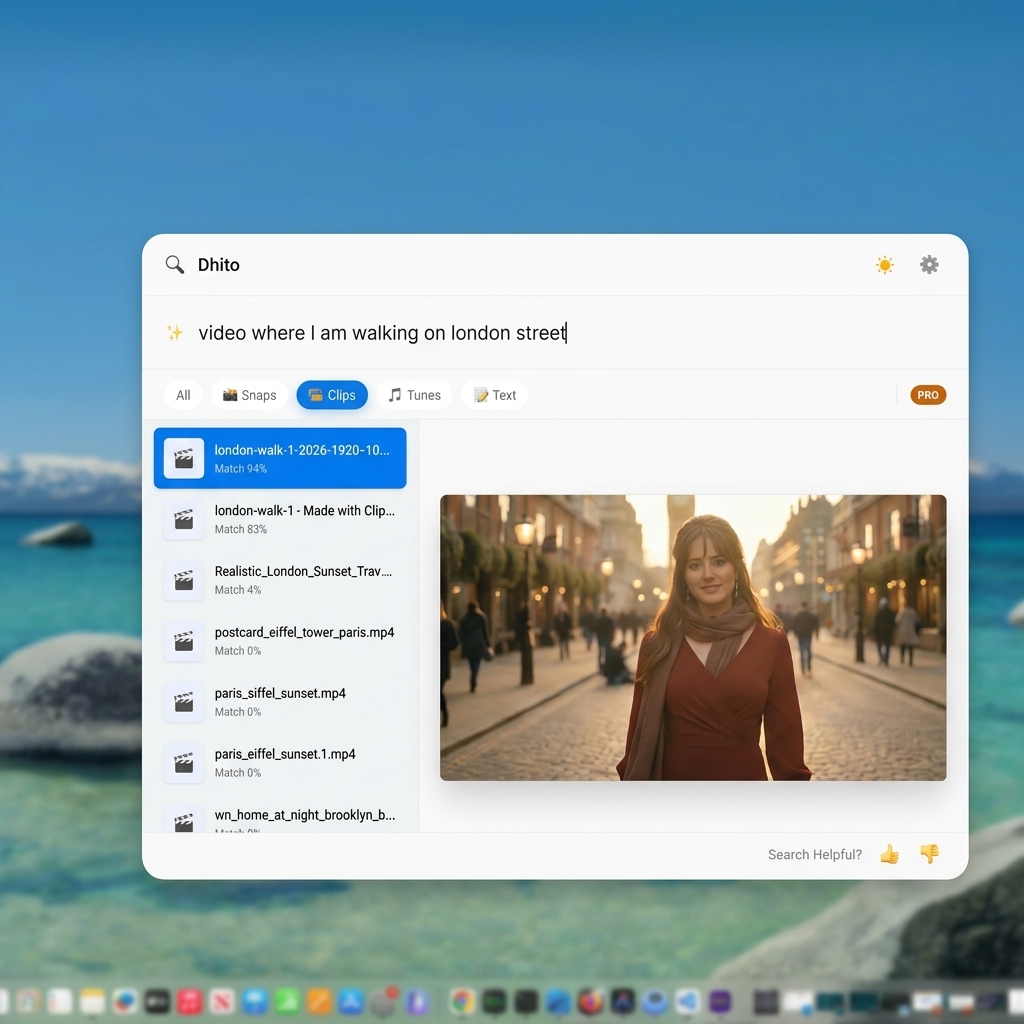
Visualizing conceptual query-to-file vector matching in Dhito
Why Semantic Search is a Game Changer for Local Files
By searching by meaning rather than keywords, semantic search offers several powerful advantages:
1. Search by Memory and Natural Language
You don't need to remember file names or folder paths. You can search exactly how you think:
- *"that PDF about solar panel installation costs"*
- *"our policy on working from home"*
- *"slides comparing competitors"*
The system understands the underlying concepts and surfaces the most relevant files instantly.
2. Cross-Media Search (Multimodal)
Modern semantic search models can process multiple modalities. This means the same semantic space can represent text, images, and audio/video transcripts.
For instance, searching for *"beach vacation"* can bring up both a PDF itinerary of your trip and an unnamed JPEG image of a sunset over the ocean, because the AI model can "see" the image content and map it to the same concept.
3. Smart Transcripts for Video and Audio
With tools like Dhito, audio and video files are transcribed in the background using local automatic speech recognition. Once transcribed, the spoken words are indexed semantically. This lets you search for ideas discussed in a three-hour meeting recording and jump straight to the exact moment they were spoken.
4. Tolerance for Typos and Rephrasing
If you make a typo, or if you use a slightly different phrasing than what is in the document (e.g., *"revenue growth"* instead of *"profit increase"*), semantic search still understands the context and returns the correct file.
Privacy-First: Semantic Search on Your Own Device
In the past, running these advanced AI models required sending your data to the cloud. But for personal and business files, privacy is paramount. You don't want a third-party server reading your private contracts, financial statements, or family photos.

Secure 100% on-device local AI semantic search and processing
This is why tools like Dhito perform 100% on-device semantic search. By utilizing optimized, local machine learning models, Dhito indexes your files and processes your search queries locally on your machine. Your private documents never leave your computer, giving you state-of-the-art semantic search without compromising your privacy.
Conclusion
Traditional keyword search is a relic of an era when computers could only match strings. With semantic search, your computer finally understands what you are looking for.
If you are ready to stop hunting for filenames and start searching by memory, download Dhito and experience the future of local file management today.
Related Articles
GDPR, HIPAA, and the EU AI Act: Why Local AI is the Compliance Shortcut
Navigating AI compliance in 2026 is a legal minefield. Here is why the easiest way to comply with GDPR, HIPAA, and the EU AI Act is to simply not use the cloud at all.
What is RAG? How Retrieval-Augmented Generation Powers Private Document Chat
Ever wonder how an AI can instantly answer questions about a 500-page PDF it has never seen before? The secret is RAG. Here is a simple, no-code explanation of how it works.
Apple Intelligence vs. Dhito: What Apple's Built-in AI Gets Right (and What It Misses)
Apple Intelligence is transforming macOS, but is it enough for power users? We break down what Apple built-in AI does perfectly, and why you still need a dedicated local search engine like Dhito.
Want to try Dhito?
Download Dhito and experience the power of local semantic search today.