Forgot the filename?
Just describewhat's inside.
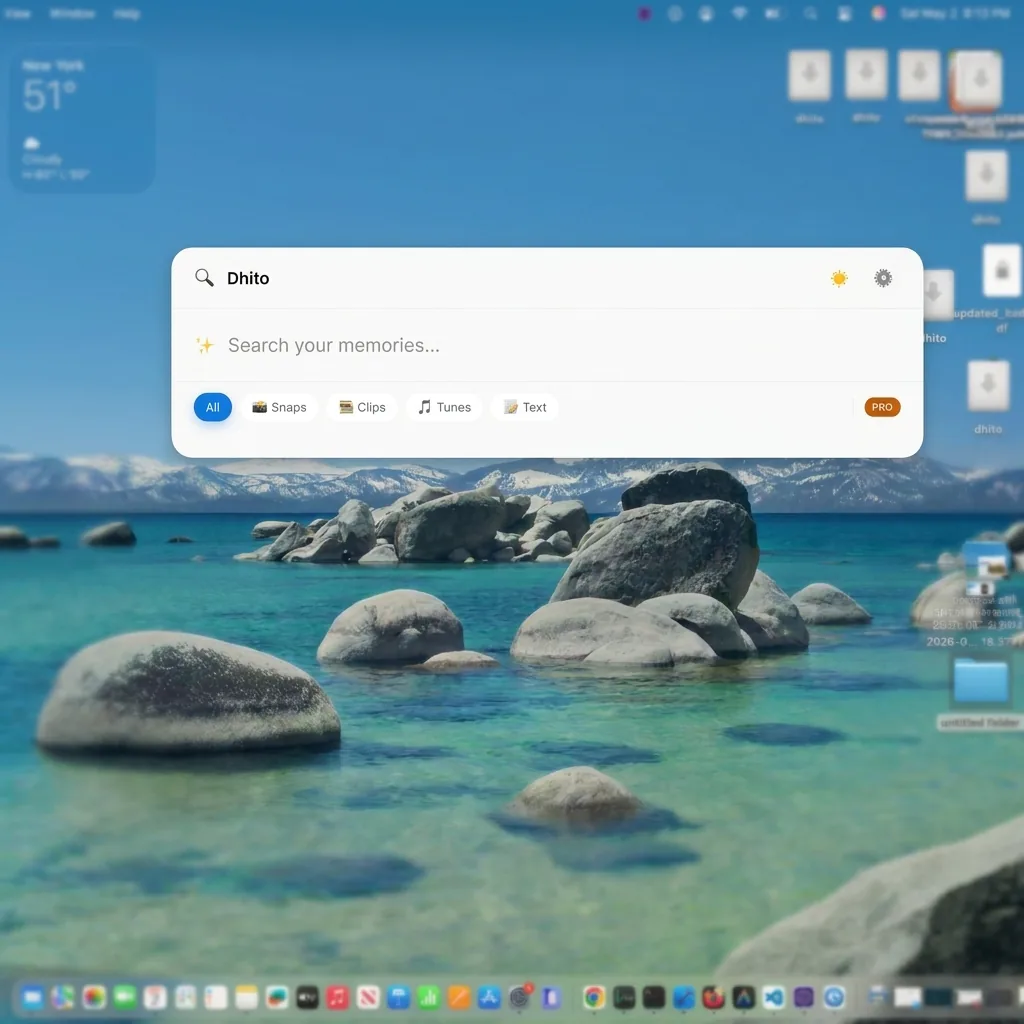
Search for “the contract with the October deadline” or “that photo from the hike” — Dhito looks inside your documents, photos, videos, and recordings to find it. Everything stays on your Mac.
Prefer the terminal? Install with Homebrew


What is Dhito?
Dhito is a private, on-device search-and-act app for macOS: it finds your files by meaning, launches your apps, chats with a document, runs ~50 file tools on what you found, and answers questions on the spot. Nothing is uploaded and no account is needed.
Find by meaning — “The tax document from 2023” finds the file even when those are not its words — inside documents, images, video and audio.
Launch apps — Matched by name or by purpose: “messaging app” finds WhatsApp, Telegram and Messages. Enter opens it.
Chat with a file — One file at a time, answered from its own passages and cited back to them.
Act on what you found — ~50 tools — convert, compress, merge, resize, strip EXIF. Every run writes a new file; the original is never touched.
Instant answers — Sums, unit and currency conversion, time zones, hashes, colours, QR codes — above the results, before the search finishes.
Apple Notes and Obsidian vaults can be added as a search source. Over 100 file extensions are indexed — PDF, DOCX, RTF, ODT, EPUB, Markdown, CSV and 33 code formats; JPEG, PNG, HEIC, WebP, PSD, TIFF, AVIF and ten camera RAW formats; 17 video and 14 audio containers — though not Excel, PowerPoint or iWork. No file data leaves the device: not contents, not filenames, not your search queries, and no usage telemetry.
Connect
Point Dhito to your local folders — plus your installed apps, and your notes if you want them: Apple Notes, or an Obsidian vault. No uploads, just access.
Process
Local AI scans content, transcribes audio, reads images, and describes your apps so they can be matched by purpose — in the background, while your Mac is idle.
Search
"The receipt from the blue coffee shop" just works. So does "messaging app", which Enter then launches, and "48kg in lbs", answered above the file results before the search has finished.
Act
Run any of ~50 file tools on what you found — convert, compress, merge, strip EXIF — or chat with the file. Nothing is uploaded, and nothing is overwritten.
Find, Then Act
Search was just the start.
Dhito doesn’t just locate your files — it understands them, and then does something with them. Convert and compress without leaving the window, launch an app by describing what it is for, chat with a document, and get an answer before the search has finished. All of it on your own machine.
~50 File Tools
Convert, compress, merge, resize, strip EXIF, extract text. Run any of them on what you just found — from a result’s right-click menu, from a multi-select, or by typing “compress” into the search box.
A tool never overwrites. Every run writes a new file beside the original, and nothing is uploaded — every verb runs on your Mac.
Chat with a File
Pick any file — including one you never searched for (💬, or ⌘⇧C) — and ask. Answers are drawn from that file’s own passages and cited back to them, by a model running on your Mac. One file per conversation.

Apps & Instant Answers
Type “messaging app” and WhatsApp, Telegram and Messages come up — matched by what they are for, not only by their names. Enter launches. And sums, conversions, time zones, hashes, colours and QR codes are answered above the file results, before the search has finished.
Documents & Notes
PDF, Word, RTF, ODT, EPUB, text, Markdown, CSV and 30+ code formats, indexed by meaning rather than filename — and, if you switch it on, your Apple Notes and Obsidian vaults searched the same way, ranked right alongside the files.

Recordings, by the Minute
Meetings, voice memos and video transcribed locally and indexed segment by segment across 17 video and 14 audio containers, with sampled frames captioned and OCR’d against their timestamp — so a search lands on the minute a topic was said or appeared on screen.

AI Vision
OCR and object detection. Search for text inside screenshots or descriptive terms like “sunset by the lake”.

Smart Rename
Tired of generic names like IMG_001.jpg? Let the local model suggest a descriptive, accurate filename from what is actually inside the file — and approve it before anything changes.
Dhito User's testimonials
Loved by everyone
across the globe
"Finally, a search tool that understands context. I found a video from 3 years ago just by describing the weather. Life-changing for my archive."
Sarah
"The 'Chat with Files' feature is magic. I drop in a 60-page paper and have the answer cited back to me before I'd have finished the abstract. The best part? It's all local. My data stays mine."
Marcus
"I found the deck, right-clicked, and compressed it to under 10MB without opening anything else. Forty-odd tools, none of them touching the original file. That's the whole workflow gone from five minutes to five seconds."
Elena
"Finding B-roll footage used to take hours. Now I just type 'sunset over mountains' and it pulls exactly what I need. Incredible tool."
David
"It searches my Obsidian vault next to my PDFs, and half the time I never get as far as the files — I type a unit conversion or a time zone and the answer is just there. Absolute game changer for my workflow."
Sophie
Beyond Spotlight
A Spotlight alternative that searches meaning, not spelling.
macOS Spotlight matches the literal characters you type against the literal characters in your filenames. When your words are not the file's words, nothing comes back — and it has no way at all to look inside a screenshot or listen to a recording.
Dhito indexes your files by meaning instead. You describe what something was about, and it finds the file even when the two share no words.
| You search for | Spotlight | Dhito |
|---|---|---|
| "client contract signature terms" | No results — the file is named Agreement_Acme_Corp_2026.pdf | Finds it, because "contract" and "agreement" mean the same thing |
| "photo of the glass conference room" | No results — the file is DSC_0982.jpg with no tags | Finds it by what the local vision model sees in the image |
| "pricing discussion with the marketing team" | No results — only the filename zoom_0.mp4 is indexed | Opens the recording at the 45-minute mark where it was said |
Worth saying plainly: Dhito does not replace Spotlight for launching apps. And Raycast and Alfred do not replace it for finding files — Alfred queries the Spotlight index, and Raycast keeps its own index of names and metadata while deferring to the OS index for file contents. Both match characters, so whatever Spotlight misses, they miss too. Dhito builds its own semantic index instead. For how the categories actually compare, read the best Spotlight alternatives for Mac in 2026, or start with how to find a file when you forgot its name.
100% Private.
Always.
Dhito is built on the principle of sovereign data. No accounts, no cloud sync, no telemetry. No file data of any kind is collected — not contents, not filenames, not your search queries. Your files and your AI models stay entirely on your disk.
Two things do reach the network, and both are worth naming. Licence validation sends a hardware ID and your billing email. And the currency answer row — on by default, with a switch to turn it off — downloads the day’s exchange-rate table once a day and converts from that copy for the rest of the day. That download is a plain request for the rates: it carries no file, no path, no identifier and nothing you typed.
Work Offline
Once set up, Dhito works entirely without internet until renewal.
Local Processing
We don't store your files. They never leave your system.
On-Device AI
Powerful AI models run natively on your hardware for privacy.

Common Questions
Everything you need to know about Dhito.
Does it slow down my system?▼
Indexing happens in the background with low priority. Once indexed, searching is near-instant and uses very little RAM.
Is Dhito a Spotlight alternative?▼
It replaces the part of Spotlight that finds files, and since 0.4.28 it launches apps as well. Spotlight matches the literal characters in your query, so it comes back empty when your words differ from the file’s words. Dhito matches on meaning instead, indexes what is inside images, audio and video, and matches apps by what they are for as well as by name — typing “messaging app” finds WhatsApp, Telegram and Messages, none of which has the word “messaging” in its name. Enter launches the one you pick. What Dhito still does not do is the rest of the command palette: no window management, no clipboard history, no snippets, and no web or System Settings results.
How is this different from Raycast or Alfred?▼
Raycast and Alfred are launchers, and both search files lexically. Alfred queries the macOS Spotlight index; Raycast keeps its own index of names and metadata and, per its manual, defers to the operating system’s built-in index for searching inside file contents. Either way no synonym resolves, so a search that failed in Spotlight fails in both. Dhito builds its own semantic index, so it is solving a different problem and works well alongside either of them.
Can I install Dhito with Homebrew?▼
Yes. Run brew tap dhito-app/tap, then brew trust --cask dhito-app/tap/dhito, then brew install --cask dhito. The trust step is required on Homebrew 6.0 and later, which refuse to load a cask from a third-party tap until you trust it. Homebrew verifies the SHA-256 of the Apple-notarized DMG before installing, and brew upgrade --cask dhito keeps it current.
What file types are supported?▼
Over 100 extensions in total: PDF, Word (DOC and DOCX), RTF, ODT, EPUB, text, Markdown, CSV and TSV, plus HTML, JSON, XML, YAML and around 33 code formats; JPEG, PNG, HEIC, HEIF, WebP, PSD, TIFF, BMP, ICO, AVIF and ten camera RAW formats images; 17 video and 14 audio containers. The gap worth knowing before you install is spreadsheets and slide decks — there is no Excel, PowerPoint, Pages, Keynote or Numbers support.
Are my files safe?▼
Dhito never overwrites a file. Search, chat and indexing only ever read, and every one of the file tools writes a new file beside the original rather than changing it — photo.jpg becomes photo-compressed.jpg, and the original is untouched. Anything Dhito does remove goes to the Trash, so the Finder’s own Put Back restores it and recovering a file never depends on Dhito being open.
What are the file tools, and do they upload anything?▼
Nothing is uploaded — every verb runs on your Mac. There are around 50 of them: images (convert to JPG, PNG or WEBP, HEIC in, compress, compress to a size budget, resize, strip EXIF and GPS, combine into one PDF), PDF (merge, split, convert to images, compress, add page numbers, watermark, extract text, compare two PDFs), spreadsheets and data (convert to CSV, Excel or JSON, clean up a CSV, format and validate JSON, generate TypeScript types), documents (DOCX, Markdown and HTML into PDF, Word, HTML, Markdown or plain text), SVG (to PNG or JPG, optimise, to a React or Vue component, to a data URI), text (diff two files, change case), audio (to MP3, compress, trim, join, extract the audio from a video), video (to MP4, compress, trim, join, to GIF, GIF to MP4) and any file at all (checksum, Base64, zip, unzip, summarise). Reach them from a result’s right-click menu, from the selection bar after a multi-select, from the 🧰 Tools tab, or by typing a verb like “compress” into ordinary search.
Do the file tools overwrite my originals?▼
No. Every run writes a new file beside the original — photo.jpg becomes photo-compressed.jpg — and the new file appears as a row at the top of your results, so you can chain the next tool onto it. Anything Dhito removes goes to the Trash, so the Finder’s own Put Back works and recovering a file never depends on Dhito being open. A bulk run reports honestly too: if it fails on two of nine files it tells you which two and keeps the other seven.
Can Dhito chat across several documents at once?▼
No, and it is worth being plain about it. Chat is one file at a time. When you start a session Dhito builds a temporary index from that single file and tears it down when the session ends, so answers come from that file’s own passages and are cited back to them. Since 0.4.30 you can start a chat on any file straight from the 💬 button (⌘⇧C) without searching for it first. There is no library-wide chat.
Can Dhito search my Apple Notes or Obsidian vault?▼
Yes, if you switch it on. Apple Notes is read from the local Notes database and needs Full Disk Access, ticked under Settings → Personal data. Markdown folders need no permission at all — Obsidian vaults are found automatically and any other notes folder can be added by hand. Notes get their own 🗒️ pill and are ranked by the same model as your documents, so they interleave with files rather than sitting above them. Unticking a source deletes those rows from the index.
What can the instant answer rows work out?▼
About twenty kinds of question, typed into the ordinary search box and answered above the file results before the search has finished; ⌘C copies the answer. Arithmetic, percentages, unit and cooking conversion, time zones, date maths, hashes, UUID v4 and v7, passwords and passphrases, Base64, QR codes, barcodes, hex colours with WCAG contrast, lorem ipsum, random numbers, strings and coin flips, text case, dictionary definitions (offline, via macOS DictionaryServices), aspect ratios, shoe sizes and currency.
Does the currency answer row phone home?▼
It downloads the day’s exchange-rate table once a day and converts from that copy for the rest of the day. The request carries no file, no path, no identifier and nothing you typed — it is a plain request for the rates. It is on by default and there is a switch to turn it off, and everything else in the answer rows is pure local computation.
What does semantic search mean in Dhito?▼
Semantic search finds files by meaning rather than exact keywords. Dhito uses an on-device model to map your query and your indexed files, returning the closest matches even if the exact words differ.
How does the initial indexing work?▼
Add folders in Settings and click Index. Dhito will scan your files locally in the background without affecting your system performance.
How do I filter results by file type or date?▼
You can select specific filters like file type or date using the filter tabs located just below the search bar.
What does the percentage score on a search result mean?▼
The percentage indicates the relevance score (cosine similarity) between your semantic query and the matching file.
What is the subscription cancellation policy?▼
Yes. We do not require long-term commitments. Your subscription is billed monthly, and you may cancel at any time. Upon cancellation, you will retain access to the application until the end of your current billing cycle.
What are the subscription pricing details?▼
$4.99 a month after a 14-day free trial, or $99 once for a one-time licence that never renews. The trial needs no account and no card. Monthly billing is genuinely month to month — there is no annual plan to commit to, so if it does not work on your files in month two, you stop paying in month two.
Why a subscription for a local app?▼
Even though Dhito runs entirely on your device without cloud API costs, keeping on-device AI performant requires ongoing work. As the underlying models and macOS itself evolve, the subscription funds re-optimising the local pipeline — Whisper, Florence-2, BGE-small-en-v1.5, the reranker and Qwen3 — so search stays fast and accurate. Because the inference runs on hardware you already own, there is no per-query metering: no token allowance, and no cap on how many files you index.